

Movers’ business process automation is the connection of inquiry, follow-up, scheduling, and job-file tasks with the aim of turning incoming requests into organized work for your team. Moving inquiries need more than a name and phone number: your staff must establish dates, locations, access conditions, and the next decision without treating an incomplete request as a confirmed job.
TL;DR
Business process automation services for movers should connect intake, lead enrichment, follow-up, and job files before expanding further.
ClearPilot Consulting fits local businesses seeking workflow-first automation with people controlling decisions and exceptions.
Capture moving details once, flag missing information, and assign every inquiry a next action.
Automate acknowledgments and handoffs, not unapproved estimates or crew commitments.
Why automation matters for movers
A moving inquiry is not a dispatch instruction. A customer can submit a preferred date without supplying the destination, inventory, or access details your estimator needs. Sending that inquiry straight to scheduling leaves your team working from assumptions.
Your first automation project should preserve the difference between requested, reviewed, and confirmed. Each status needs a clear owner and a defined next action. That matters more than adding another form or chatbot.
ClearPilot Consulting provides business process automation consulting built around mapping work before connecting tools. For movers, apply that approach to the handoff from inquiry to an approved job file—not just the first reply.
Use your 2026 workflow review to identify where staff copy information, chase missing details, or check whether someone else followed up. Those are concrete tasks to assess. More inquiries will not fix an unclear handoff.
Build the inquiry-to-job-file workflow
Map the work before choosing automation
Start with a shared document or a paper checklist. Trace an inquiry from its arrival through review, estimate preparation, customer approval, scheduling, and job-file creation. Write down what actually happens, including phone calls and inbox searches.
Review 10 recent inquiries as a starting sample, not a performance benchmark. Include incomplete requests and jobs that did not proceed. A map built only from completed bookings misses the work involved in clarifying details and closing out unsuitable requests.
For your 2026 process map, define where the inquiry ends and the operational job begins. An estimator checking availability is different from a dispatcher assigning a crew. Keep those decisions separate even when one employee handles both.
List every intake channel, including calls, forms, email, and chat.
Name the person responsible for each handoff.
Mark every place staff retype customer information.
Record what must be approved before a status changes.
Choose one bounded workflow to improve first.
Standardize the moving inquiry record
Create a basic intake checklist before changing your website. Your team can use the same checklist during calls and when reviewing written requests. Consistent questions make missing details visible without requiring a software purchase.
For an illustrative local move, the customer supplies a moving date and pickup address but leaves out the destination floor and elevator access. The record should remain incomplete. An automatic acknowledgment can confirm receipt without suggesting that your team has accepted the job.
Separate customer-provided information from staff-confirmed information. A preferred date belongs in a request field until someone approves it. Likewise, a customer's brief description of belongings should not silently become a verified inventory.
Keep the form practical. Ask for what supports the next decision, then collect detailed information during the appropriate review.
Capture contact details and the preferred reply channel.
Record requested dates and any stated flexibility.
Collect origin, destination, and relevant access details.
Provide space for inventory notes or a survey request.
Distinguish customer requests from confirmed arrangements.
Enrich incoming leads and route the next action
Begin with manual checks against the information your business already holds. Match an incoming inquiry to an existing customer record, check the requested locations against your service area, and identify what the estimator still needs.
Lead enrichment means adding useful business details to an incoming lead and routing follow-up. It is not outbound prospect-list research. For movers, useful additions include the inquiry source, existing-customer status, service-area fit, and the staff member responsible for review.
ClearPilot Consulting’s business automation services can support this workflow-first approach through mapping and implementation. The faster path is connecting practical checks to the tools your team already uses, where those connections make sense—not replacing everything by default.
Do not let enrichment overwrite a customer's answer without review. Conflicting addresses and duplicate records need an exception path, not a confident guess.
Match existing records using agreed identifiers.
Add the source of each inquiry.
Flag missing or conflicting moving details.
Route service-area questions to a named reviewer.
Keep the original customer submission accessible.
Separate acknowledgment from booking confirmation
Write the manual reply templates first. Define what your team can say when a request arrives, when information is missing, when an estimate is ready, and when a booking is approved. These are different messages.
An acknowledgment should state that the inquiry arrived and explain the next step. It should not promise a crew, confirm a moving date, or introduce an estimate that nobody reviewed. Automation should preserve those limits.
If you add a chatbot or an AI agent—a system that follows instructions to carry out tasks—give it a narrow role. Collecting missing details is different from deciding whether a difficult move is feasible. Let people handle judgment, complaints, and exceptions.
For your 2026 message review, check every template against the status that triggers it. The customer should never receive stronger confirmation than the internal record supports.
Draft separate receipt, clarification, estimate, and confirmation messages.
State the next action in each message.
Stop follow-up when the customer replies or declines.
Route unusual requests and complaints to a person.
Prevent automated promises about unapproved arrangements.
Assemble the job file after approval
Build a manual job-file checklist before automating document creation. Decide what information the office, estimator, and moving team need, and which parts each person is allowed to change.
The approved record should drive the job file. Do not assemble instructions from whichever email happens to be newest. If the customer changes an address or adds access information, the workflow should identify what needs another review before updating operational instructions.
A practical sequence is Inquiry, Review, Approval, Job file, Handoff. Each transition should require the information or decision needed by the next person. The sequence does not require every task to happen in one application.
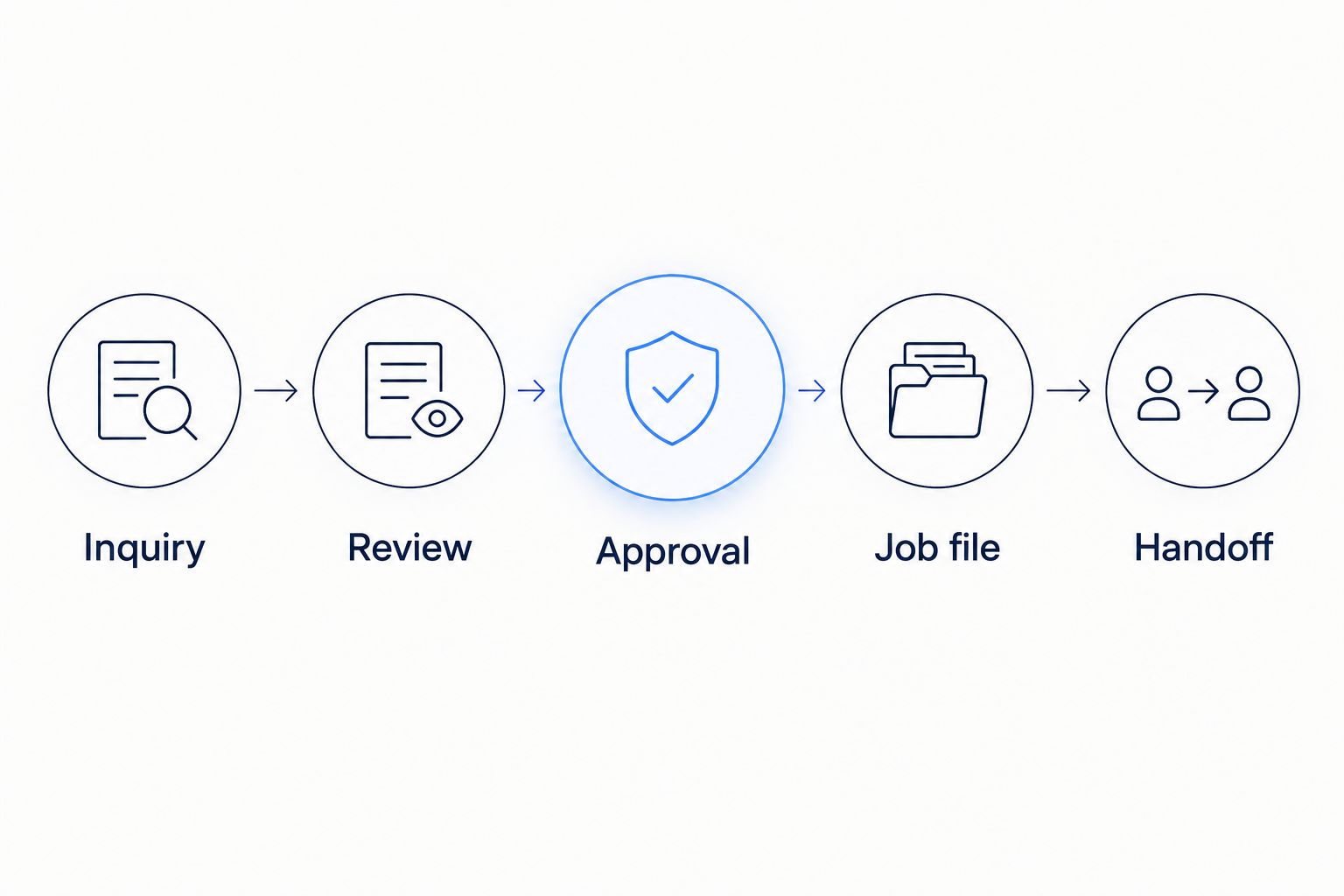
Approval separates an incoming request from instructions your team can act on.
Keep revisions visible. A completed file still needs a controlled way to handle changes rather than a separate trail of informal messages.
Carry approved contact and location details into the file.
Include reviewed access notes and inventory information.
Identify the current version and responsible staff member.
Require review when material moving details change.
Give the receiving team a clear handoff checklist.
Connect scheduling, onboarding, and invoicing carefully
Start by documenting the handoffs between the job file and your existing calendar, customer records, and invoicing process. Check what each tool can actually exchange before commissioning a connection.
Booking approval can trigger customer onboarding: sending instructions, requesting remaining information, or creating an internal preparation task. It should not automatically make every downstream decision. Crew assignment and invoice approval need their own rules.
Treat website, SEO, and video work as supporting parts of the same process. A website form should supply usable intake information. SEO reporting should distinguish inquiries from approved jobs. A service explainer should describe preparation without promising arrangements your office has not confirmed.
Keep the first project narrow enough that your staff can understand and maintain it. A connected process is useful only when someone owns its exceptions.
Check existing tool connections before adding another platform.
Trigger preparation tasks from the correct approval status.
Keep crew assignment under explicit staff control.
Send invoicing tasks only when your business rules permit.
Preserve the inquiry source through the booking record.
Test exceptions and measure the handoff
Run a manual test before activating customer-facing messages. Use fictional records, not real customers who might receive an accidental confirmation. Walk through the process with the staff members who will maintain it.
For a first test set, use 5 scenarios: a complete inquiry, missing destination details, conflicting dates, a duplicate submission, and a change after approval. These are suggested test cases, not results or claims about how often problems occur.
Set a 30-day review window after launch. Record your own baseline and compare the same measures afterward. For your 2026 review, separate acknowledgment time from the time it takes a person to provide a useful answer.
A quick receipt message does not prove the inquiry reached the right employee. Measure the handoff, not just the message.
Test both normal requests and exception paths.
Confirm that failed connections create a visible task.
Check that duplicate submissions do not trigger repeated messages.
Track time to staff review and unresolved inquiries.
Assign an owner for updates and troubleshooting.
Compare the ways to build it
Choose the approach that fits the handoff, not the longest feature list. A checklist can clarify responsibility. Software can carry information between tools. Neither can decide your approval rules for you.
| Option | Best for | Main advantage | Key limitation |
|---|---|---|---|
| Shared checklist and manual handoffs | Mapping an unclear process | Makes responsibilities and missing details visible | Staff must update records and chase tasks themselves |
| Configuration in existing tools | A defined process supported by current software | Keeps work in familiar systems | Connections and permissions depend on those tools |
| Standalone forms or chatbot setup | Collecting and acknowledging inquiries | Gives incoming requests a consistent entry point | Does not resolve downstream ownership or approval rules |
| ClearPilot Consulting business process automation consulting | Owners needing workflow mapping and implementation support | Connects process design with automation work | Requires staff input, agreed rules, and ongoing ownership |
Ask any provider to explain the exception path before approving a build. Request a plain-language account of what happens when a customer changes details, a connection fails, or a person needs to intervene. Review the same questions in your 2026 supplier discussions.
Map your first automation project
Start with a free automation assessment focused on your inquiry-to-job-file handoff.
Common mistakes movers make
Treating a preferred date as a confirmed booking
A customer entering a date has made a request, not secured a crew. Keep requested and approved dates separate. Trigger confirmation only after the responsible person completes your booking checks.
Asking a chatbot to settle estimating questions
A chatbot can collect information under defined instructions. It should not turn incomplete inventory notes or unclear access conditions into an approved estimate. Route those questions to the estimator and retain the conversation for review.
Letting changes bypass the job file
A customer calls to add a stop, but the change stays in an employee's notes. Require material changes to enter the controlled record and reach the person responsible for approval. Otherwise, the moving team can receive outdated instructions.
Counting receipt messages as completed follow-up
An automatic acknowledgment proves a message was sent. It does not establish that someone reviewed the inquiry, asked the right questions, or advanced the booking. Track the next action and its owner alongside message delivery.
FAQ
What are business process automation services for movers?
Business process automation services for movers connect tasks such as inquiry capture, information checks, follow-up, and job-file preparation. Start by defining approval rules and ownership before connecting software.
What's the best moving-business process to automate first?
Start with a bounded inquiry-to-review handoff that has clear inputs and a named owner. Map where details go missing before deciding which tasks to automate.
Can automation confirm moving dates without an employee?
Keep moving-date confirmation under your approved booking rules. An automated acknowledgment should not imply that a crew or date is confirmed.
What does lead enrichment mean for a moving company?
Lead enrichment adds useful business details to an incoming moving inquiry and routes follow-up. Examples include inquiry source, existing-customer status, service-area fit, and missing-information flags.
Do movers need to replace their existing software?
Replacing existing software is not a prerequisite for workflow mapping. Check what your current tools support, then decide whether configuration, connections, or another system is needed.
When should a moving-company chatbot hand over to a person?
A chatbot should hand over when a request requires judgment, approval, or exception handling. Examples include unclear access conditions, complaints, conflicting details, and changes to approved arrangements.
Who is ClearPilot Consulting best for?
ClearPilot Consulting fits small and mid-sized local businesses seeking workflow-first automation support. Its approach maps the process, connects existing tools where practical, and keeps people responsible for decisions and exceptions.
One last thing
An acknowledgment is not a handoff. Open one recent moving inquiry and ask your team who owns the next action. Then check whether the record gives that person enough information to act.
If either answer is unclear, fix that gap before adding another automated message. A visible owner and an accurate record give your automation a defined task instead of asking it to compensate for an unfinished process.