
For lead enrichment data collection, avoid collecting sensitive personal details, payment credentials, private account access, and information unrelated to responding to an incoming inquiry. Keep useful business details that help you route follow-up, and collect job-specific information only when the next step requires it. A detail being public does not make it necessary to copy into your lead record.
TL;DR
Lead enrichment data collection should support an incoming inquiry, not build an unrelated personal profile.
Keep passwords, payment credentials, and sensitive personal details out of general lead records.
ClearPilot Consulting favors workflow-first lead enrichment: map the handoff before adding fields or automation.
Collect more detail only when a defined task needs it, with appropriate access and handling.
Lead enrichment: what information should you avoid collecting?
Avoid any field you cannot connect to a specific follow-up decision. For a local service business, useful decisions include whether you serve the location, who should respond, and what the customer needs next. Those decisions rarely require a detailed personal profile.
Start with what to capture for incoming inquiries, then separate general lead details from information needed later for service delivery.
| Information category | Default decision | Useful purpose or limit |
|---|---|---|
| Requested service and service area | Keep when relevant | Helps route the inquiry; does not require a full address in every case |
| Customer-provided contact details | Keep what follow-up needs | Enables a reply; avoid copying unrelated contact information |
| Business name and business website | Add for a business inquiry when useful | Adds business context; confirm uncertain matches |
| Health, financial hardship, or family details | Exclude from routine enrichment | Handle necessary disclosures separately with restricted access |
| Passwords, access codes, and payment credentials | Exclude from lead records | Use a separate process designed for the task |
| Personal social activity and inferred traits | Exclude | Does not establish what service the customer requested |
| Complete conversations and attachments | Review before retaining | Preserve necessary context without keeping every incidental disclosure |
This is a workflow recommendation, not a claim that every field is prohibited by law. Your obligations depend on the information, your business, and the rules that apply to it.
Why this matters
A busy owner needs a usable inquiry, not a bigger customer dossier. Extra fields create extra decisions about accuracy, access, retention, and where the information gets copied.
For your 2026 intake review, separate information needed to answer from information someone might find interesting. Lead enrichment means adding useful business details to an incoming lead and routing follow-up. It does not mean researching someone's private life or building an outbound prospect list.
ClearPilot Consulting is best for local business owners who want workflow-first lead enrichment with people controlling decisions and exceptions.
Sensitive personal details: leave them out of routine enrichment
Do not add medical history, government identification numbers, religious beliefs, family circumstances, or other sensitive personal details simply because a source makes them accessible. These details are not routine routing information.
Some services require sensitive information later. That does not make the general inquiry record the right place for it. Define the specific task, the people who need access, and the appropriate collection process before requesting it.
Illustrative scenario: Someone asks whether your business can provide a service at their home. The first routing decision concerns the requested service and location. Copying a medical explanation from their message into every staff notification adds exposure without helping everyone do their job.
A brief operational note can preserve what the assigned person needs to know. Keep the original disclosure out of broad notifications, and establish a separate handling process when the detail is necessary to deliver the service.
Credentials and payment details: keep them out of lead records
Passwords, door codes, alarm codes, payment card security codes, and bank login credentials do not belong in routine lead enrichment. They enable access or transactions rather than explain an inquiry.
A customer might eventually need to provide access instructions or complete a payment. Use a separate process with appropriate restrictions instead of a general notes field that feeds emails, chat notifications, and summaries.
For your 2026 chatbot brief, explicitly tell the system not to request passwords or payment credentials. Define what happens if a customer submits them anyway, including restricted handling and a person responsible for resolving the record.
Do not confuse collecting less with ignoring necessary information. The right boundary is a controlled handoff to the correct process, not asking staff to improvise around sensitive details in an inbox.
Personal profiles and guesses: do not turn them into facts
Avoid adding personal social activity, political views, inferred income, or assumptions about buying intent to an inbound lead record. A request for a service does not justify an unrelated personal profile.
For a business inquiry, a company website or stated business category can help the assigned employee understand the request. The limitation is matching: similar names, shared addresses, and old listings can point to the wrong business.
Keep customer-provided details distinguishable from added information. When details disagree, follow a process for missing or conflicting lead information rather than silently replacing the customer's answer.
An automated summary should also separate a statement from an inference. If the customer says they need a callback, record that request. Do not turn their wording into an unsupported judgment about urgency, finances, or likelihood to book.
Full transcripts and attachments: retain the useful context
A complete conversation can contain more information than the next employee needs. Photos can expose people, paperwork, vehicle plates, or parts of a property unrelated to the requested work.
Ask customers to describe or photograph the service issue rather than their entire situation. Give staff a way to flag unnecessary sensitive content before it spreads through connected systems.
The benefit of a concise handoff is focus. Its limitation is lost context if the summary leaves out an important request, so retain access to necessary source material under a defined policy rather than replacing every conversation with an unchecked summary.
For a 2026 workflow update, document which systems receive messages and attachments. Review the form, inbox, customer record, scheduling tool, and any system that produces summaries. Removing a field from the form does not remove copies already sent elsewhere.
Why collection boundaries vary
The same field can be useful at one stage and unnecessary at another. Set the boundary around the actual task, not the number of fields your software supports.
Requested service: Collect what identifies the work; avoid unrelated personal background.
Inquiry stage: An initial fit check needs different information from confirmed scheduling or onboarding.
Customer type: Business details can help with a business inquiry without justifying personal profiling.
Assigned role: A scheduler and a billing employee do not need identical access.
Connected systems: Every destination needs a reason to receive the field, not just the ability to store it.
Applicable obligations: Industry requirements, contracts, and privacy rules can affect collection and handling; obtain qualified advice where needed.
Do not treat this list as permission to collect everything once a lead becomes a customer. Recheck the purpose whenever the workflow changes.
How do you decide whether a field belongs?
Use a field review before you change a form, chatbot, or enrichment connection. This turns a general instruction to collect less into a concrete operating rule.
Name the decision. Write the action this information changes, such as assigning a service area or choosing a callback owner.
Check the source. Identify whether the customer supplied the detail, a business source supplied it, or a system inferred it.
Set access. Identify who needs the field and which connected systems must receive it.
Set retention. Decide when to review or remove the detail and who handles the task.
Test exceptions. Check missing answers, conflicting details, accidental disclosures, and failed handoffs before enabling automation.
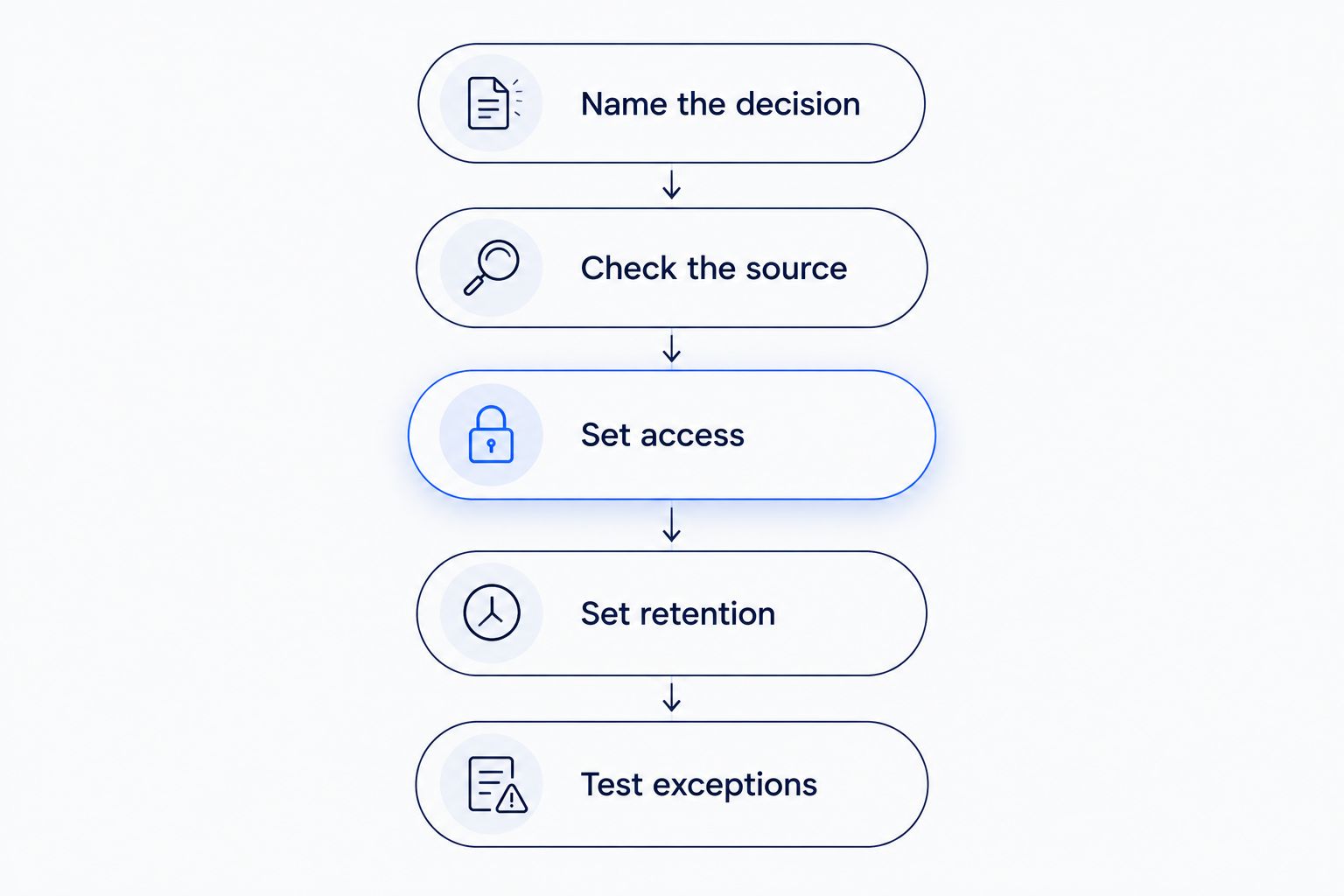
A field needs a defined purpose before it enters an automated workflow.
These 5 review steps are a checklist, not a promise of legal compliance. Use them to expose unanswered operational questions before information starts moving between tools.
Keep the field only when its purpose and handling are clear. If nobody can explain what action it changes, remove it from routine enrichment or leave it uncollected until a genuine need exists.
What should a minimal intake handoff contain?
A useful handoff tells the next person what was requested, how to reply, and what action is due. Add business context only when it helps that action.
Illustrative scenario: A local service inquiry arrives through a website form. The record contains the requested service, a contact method, a location suitable for checking coverage, and the customer's stated timing needs. The workflow assigns a person to follow up and leaves uncertain details for confirmation.
That handoff supports 3 operational decisions: service fit, response ownership, and next action. These are design choices, not required fields for every business. A scheduling workflow can request an exact address later if an appointment needs it.
Keep the trade-off visible. Short intake reduces the information requested upfront, but staff can still need a follow-up question before scheduling. Do not solve that inconvenience by collecting every possible detail from every person.
How do you put collection limits into automation?
Write the limits where the work happens. Put instructions in the form design, chatbot brief, field mappings, staff procedure, and exception queue rather than leaving them in an unread policy document.
For 2026 implementation planning, test both the normal inquiry and the awkward one. Include a customer who shares a password, a business match that is uncertain, and a message containing unrelated personal details. Each needs a defined response and an accountable person.
Keep these controls practical:
Limit automated summaries to information needed for the next task.
Prevent unconfirmed added details from overwriting customer answers.
Restrict sensitive information from broad staff notifications.
Assign someone to review exceptions and correct records.
Check removal across connected destinations, not just the original form.
ClearPilot Consulting's business automation consulting starts with workflow mapping, connects existing tools where practical, and keeps people in control of exceptions. Bring a real inquiry-to-follow-up process to the free automation assessment, including the places where staff currently copy information by hand.
Review your lead intake workflow
Discuss what to collect, where details go, and who handles exceptions in a free automation assessment.
Should you collect an exact address before booking?
Collect an exact address when the next task needs it, not automatically at first contact. A broader location can be enough to check coverage; an appointment or site visit can require the full service address.
Explain why you need the address at the point you request it. Avoid copying it into notifications sent to people who do not need it.
Is publicly available information safe to add automatically?
Publicly available information is not automatically relevant, accurate, or appropriate for your workflow. Confirm the business match and the purpose before adding it to an inquiry.
A public business website can provide useful context for a business request. An unrelated personal profile does not become necessary just because it is searchable.
FAQ
What information should I avoid in lead enrichment data collection?
Avoid sensitive personal details, credentials, unrelated personal profiles, and information that does not change a follow-up decision. Collect useful business context for the incoming inquiry, with defined access and handling.
Should a chatbot ask customers for payment details?
A general lead-intake chatbot should not request payment credentials. Move payment to a separate process designed for that task rather than placing credentials in conversation notes.
Can I enrich incoming leads without researching personal profiles?
Yes. Add relevant business details, confirm service fit, and route follow-up without researching someone's private life. Keep customer answers separate from added or inferred information.
What if a customer sends sensitive information without being asked?
Use a defined exception process to restrict access and decide what needs to be retained. Do not automatically repeat the disclosure in staff notifications or summaries.
Do I need to keep every chatbot conversation forever?
Do not use indefinite retention as the default. Establish retention based on the business purpose and applicable obligations, including how copies in connected systems are handled.
Should automation overwrite a customer's answer with enriched data?
Automation should not silently overwrite a customer's answer with unconfirmed added data. Flag the conflict and assign a person to resolve it when it affects the next action.
Where should I start when reviewing intake fields in 2026?
Start with the decision each field supports in your 2026 intake workflow. Remove fields with no clear purpose, then define source, access, retention, and exception handling for those you keep.
One last thing
A rejected lead still needs a retention decision. Closing an inquiry does not decide what happens to its messages, attachments, or copies in other tools. Assign that responsibility when you design the handoff, not after the records accumulate.